
UNUM · Enterprise UX · Workforce Management · 2021
Modernizing internal tools for workforce management teams
The challenge
UNUM's CBS (Customer Benefits Success) org depended on a legacy audit application to evaluate work, identify errors, and support employee development. As operational demands grew, the technology became increasingly difficult to maintain and the experience introduced friction into an already complex process.
My role
Working in a hybrid role as both UX Designer and front-end developer. I helped translate complex audit workflows into a more structured, usable application. My work spanned workflow design, interface architecture, reusable components, implementation, and adoption support.
Impact
Reduced training burden for 27 auditing managers, increasing assessment efficiency for 452 claim specialists across two UNUM US based offices, and establishing a reusable design pattern for future applications.

What’s at stake
The people we’re really designing for
Behind every insurance claim is a person navigating a potentially life-changing event. Whether facing an illness, injury, or unexpected loss of income, customers depend on accurate and timely claims processing during moments when financial stability matters most.
UNUM provides income-protection benefits to more than 45 million employees worldwide. Claims specialists manage complex, time-sensitive claims where accuracy, consistency, and sound judgment are essential.
CBS auditing managers review claims, identify errors, evaluate performance, and work alongside learning and development teams to support more than 450+ claims specialists across the Chattanooga and Portland offices.

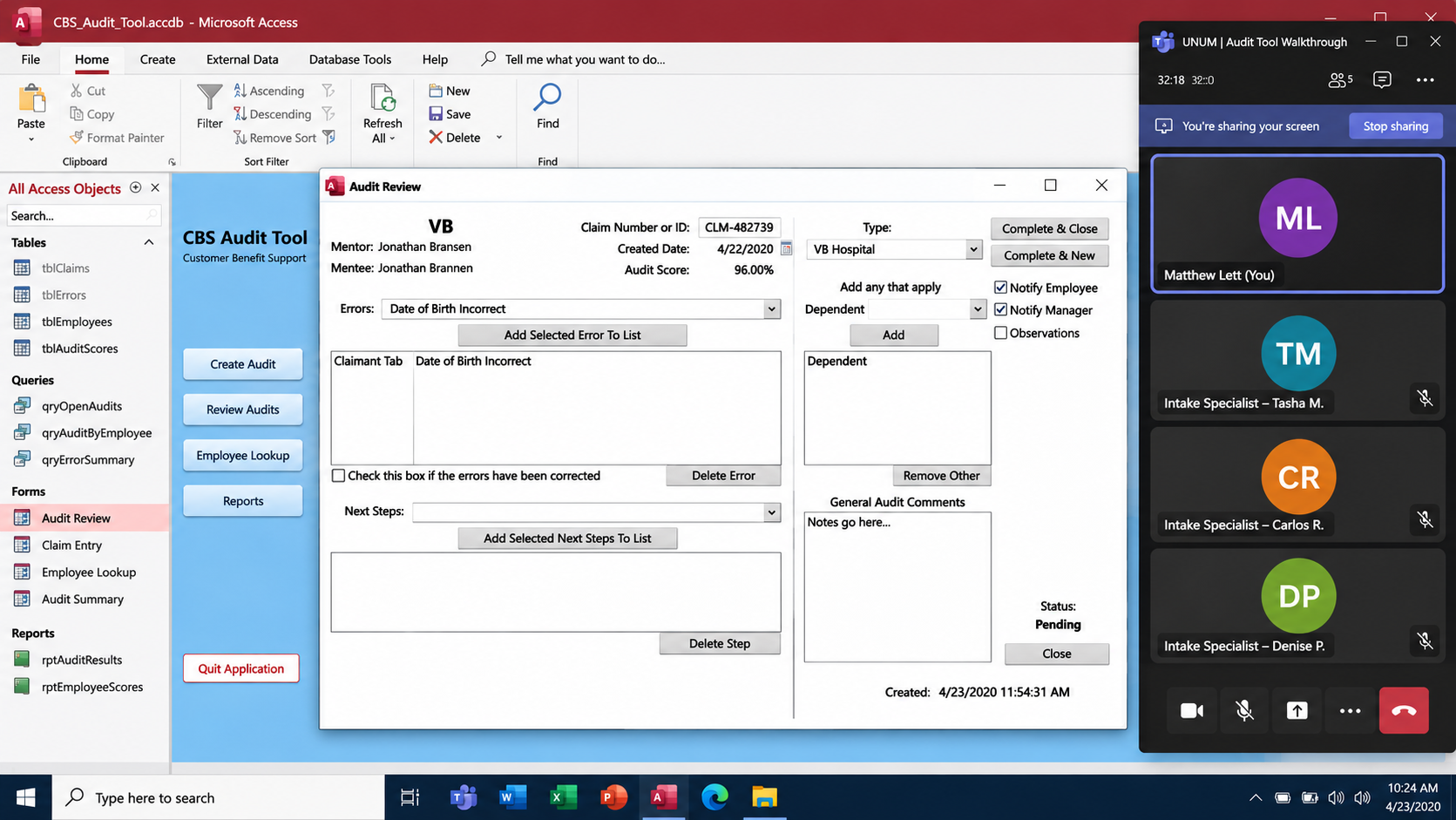
A specific claim auditing tool was becoming increasingly difficult to maintain and use. Beyond it’s aging technology and dated interface, usability problems created friction for employees carrying out important operational responsibilities.
I reviewed the application to understand how it was setup and built.
I also needed to understand the people that depend on their employee benefits, how specialists make their decisions, and the challenges they encounter in going from 0 to 1, getting a claim approved.
Discovery · CBS audit review tool
The tool that ensures employee benefits cliams are handled with excellence
Taking time with users · Informs design decisions
Learnings from speaking with CBS Auditors
01 — Familiarity Masked Poor Usability
Auditors had unclear starting points within the UI. The redundancy using the tool is what helped them compensate for usability problems rather than eliminate them.
02 — The Interface Increased the Risk of Errors
Poor visual hierarchy, inconsistent formatting, and closely positioned controls made input and selection mistakes easier during accuracy-sensitive audit workflows.
03 — Performance Disrupted the Workflow
Slow response times interrupted even simple tasks, revealing that the experience was affected by more than interface design alone.
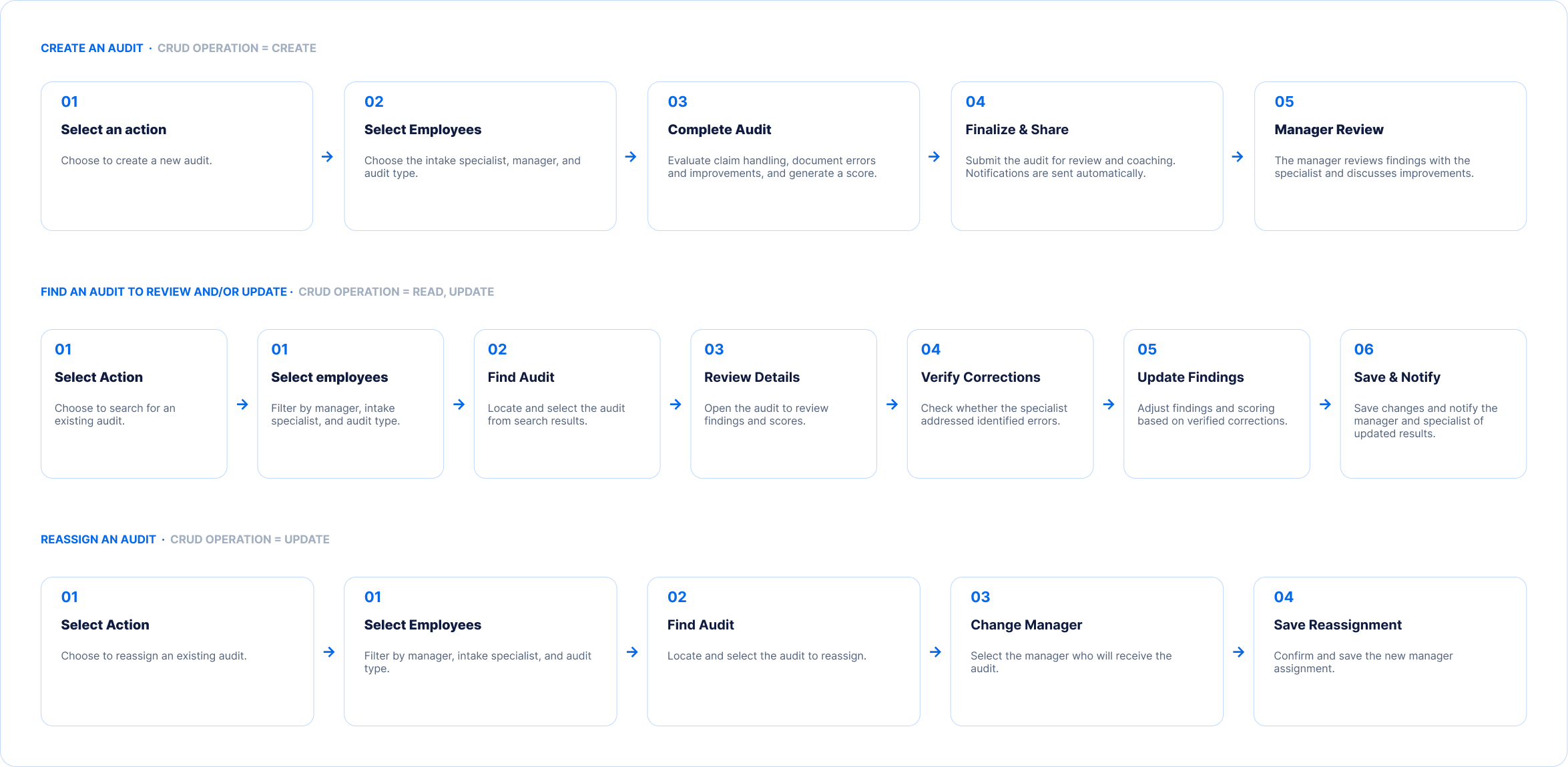
User flow design · Understanding the jobs to be done
Mapping out the CBS Auditor Workflows
Before redesigning the internal quality review tool, I mapped the CBS auditors’ key tasks and workflows. Auditors evaluate how newly hired intake specialists process claims, identify areas for improvement, and ensure adherence to company procedures and regulatory requirements.
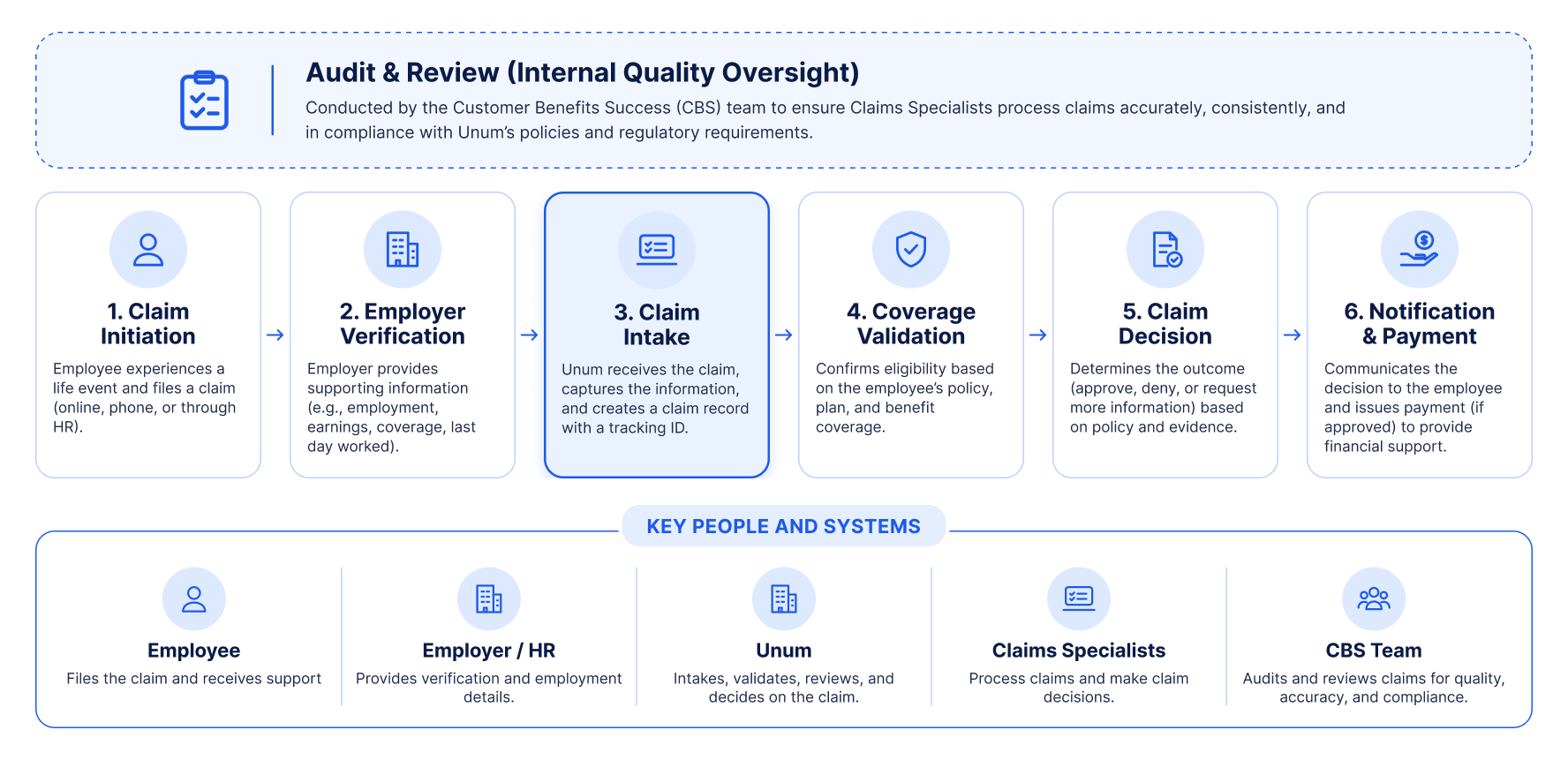
Design discovery · Service map
The service experience behind every claim
I mapped the end-to-end claims processing journey to understand the people, systems, and handoffs involved in delivering financial support during critical life events. Through collaboration with stakeholders, leadership, engineers, and customers, I gained a broader understanding of the service experience.
Tech constraints and complexity laid underneath a “simple” design
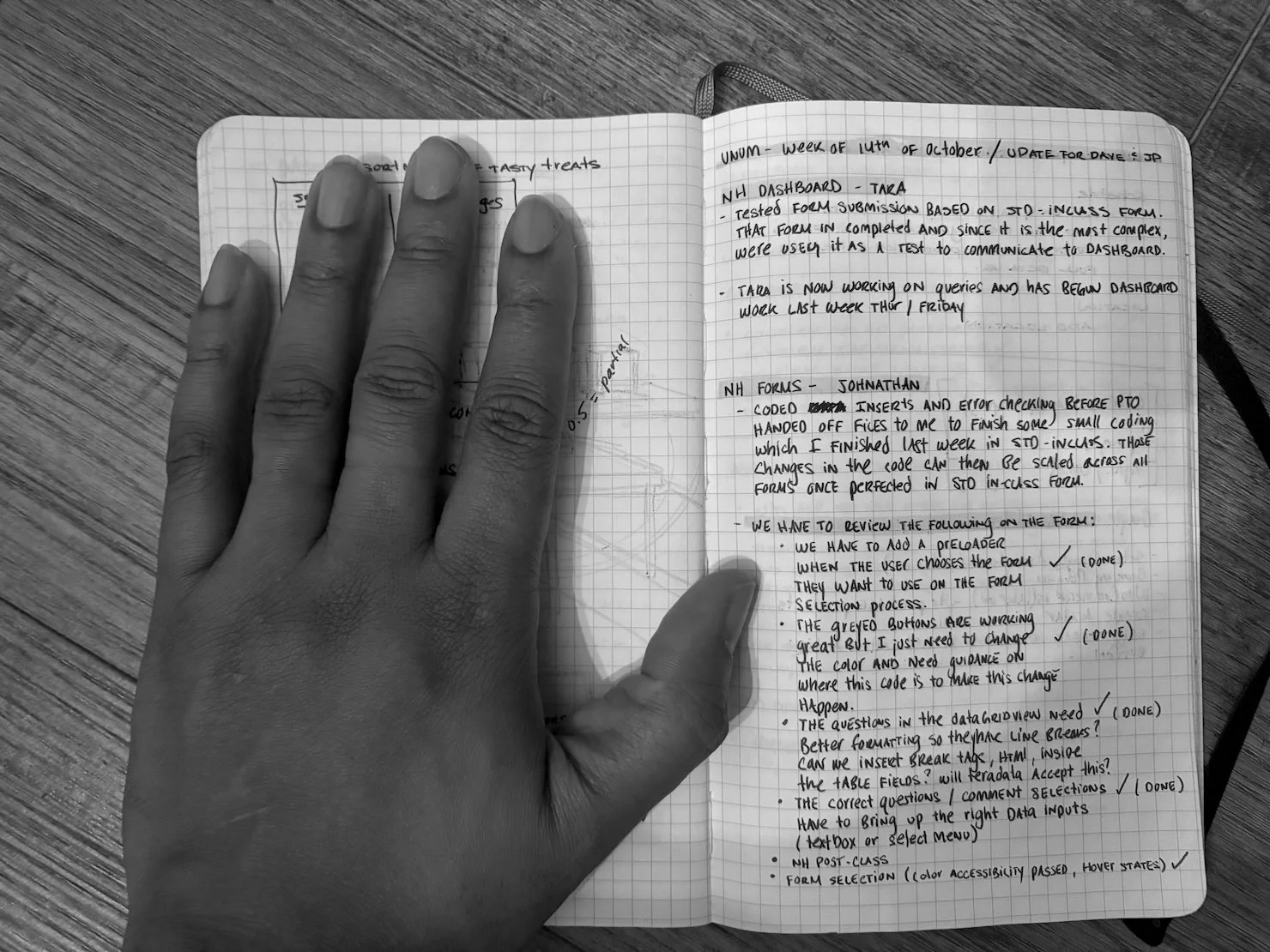
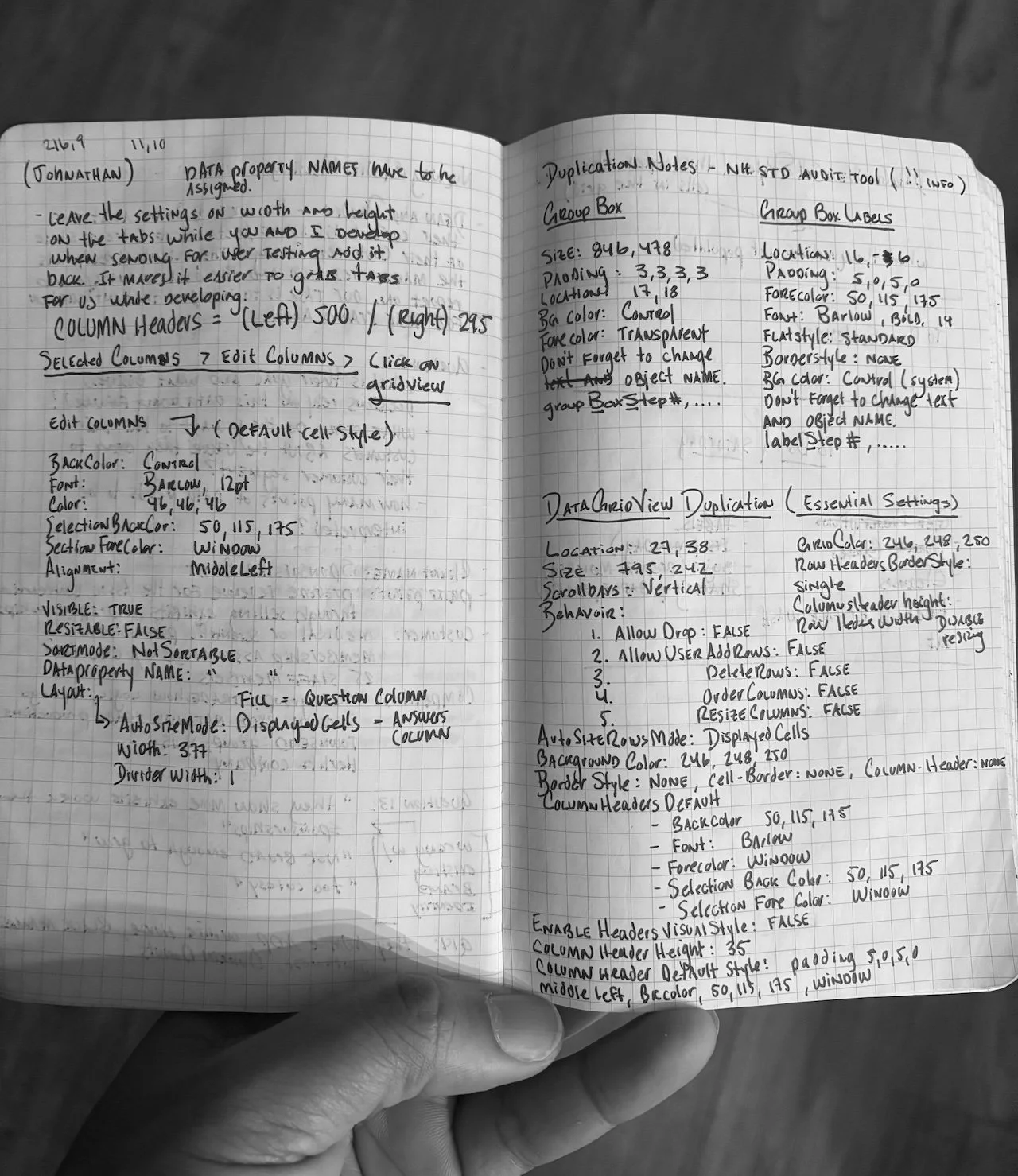
This was my first enterprise design project, and modernizing the app meant quickly teaching myself Visual Studio and Microsoft's development frameworks.
With three months and tight technical constraints, I skipped open-ended exploration and focused on understanding the existing technology and prioritizing high-impact usability improvements. There was no design system, since internal audit tools had historically bypassed Unum's brand standards.
The project came with a lot of ambiguity: unclear technical limits, shifting "can'ts" and "maybes," and no established patterns to follow.
I worked through it with self-learning, targeted questions, and steady iteration, partnering with stakeholders to land on solutions we could actually build.
Design process · Working through ambiguity
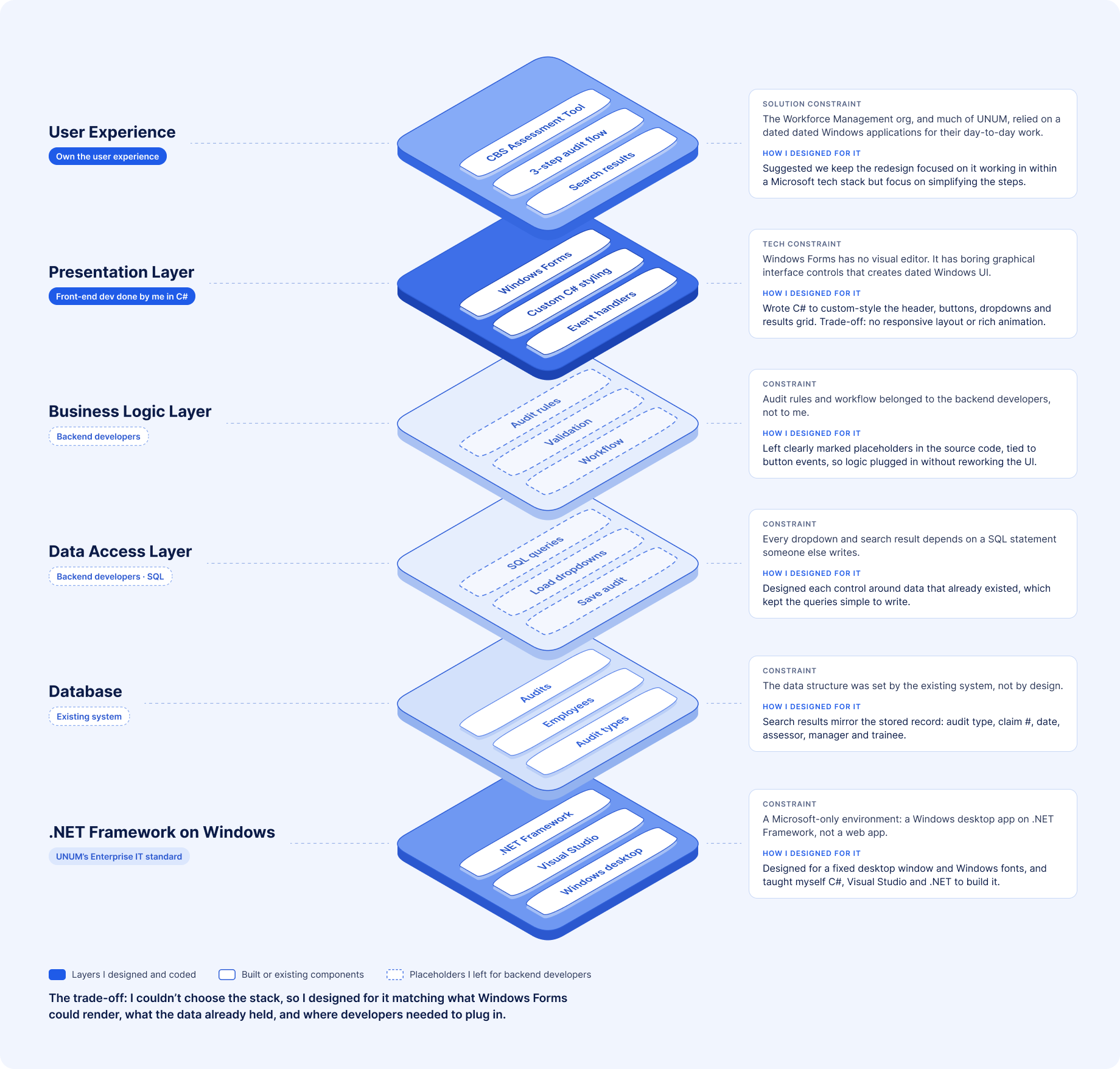
Design Process · Solution constraint mapping
This map shows the technology environment behind the CBS Assessment Tool redesign, a Windows desktop application built on Microsoft's .NET Framework, where I designed the interface and wrote the C# front-end code while backend developers handled the business logic and SQL.
Rather than design an ideal state, I had to weigh what UNUM’s tech stack could handle. Those constraints would later inspire the simplicity in design style I chose of minimal; inspired by the Windows operating system users would load the application on enterprise design decision.
Within the project's technical and timeline constraints, I prioritized clearer workflows, stronger information hierarchy, and more intuitive interactions that reduced opportunities for error.

Designs
Making the audit workflow easier to navigate
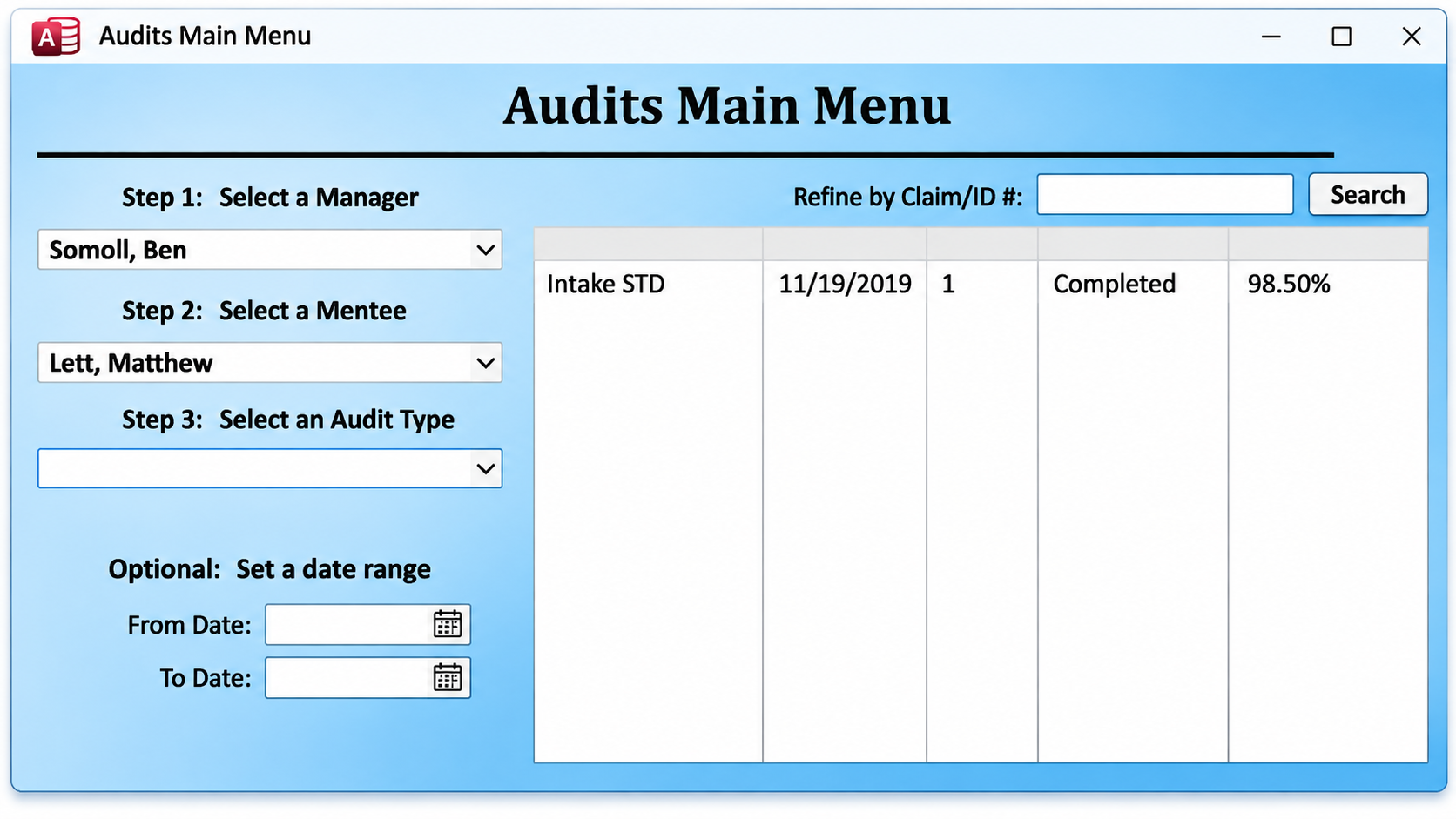
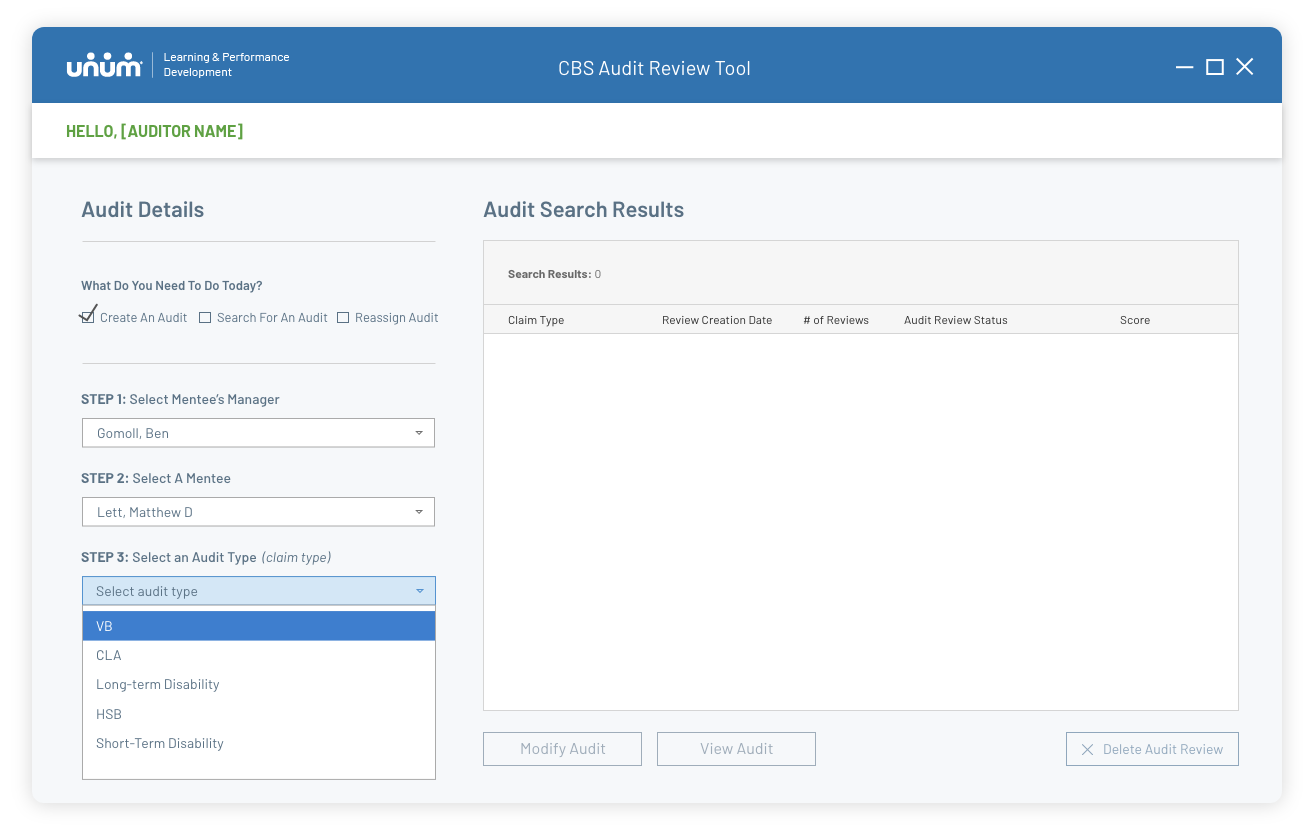
Auditors needed a clearer starting point for selecting specialists, finding audits, and choosing the next action.
Design Decisions . Tradeoffs
One of my biggest challenges was pushing the visual and functional limitations of Windows Forms. Native WinForms controls inherited the familiar Windows operating system look and feel, leaving limited flexibility for creating a more modern, cohesive experience.
I reorganized the interface to make key audit tasks easier to identify and complete. The redesign introduces clearer action choices, groups employee and audit selections into a guided sequence, and separates search results from audit details. I also improved labeling, spacing, and visual hierarchy to help auditors navigate the application with less guesswork.
Designs
Making the audit workflow easier to navigate
Auditors needed a clearer starting point for selecting specialists, finding audits, and choosing the next action.
Design Decisions . Tradeoffs
One of my biggest challenges was pushing the visual and functional limitations of Windows Forms. Native WinForms controls inherited the familiar Windows operating system look and feel, leaving limited flexibility for creating a more modern, cohesive experience.
I reorganized the interface to make key audit tasks easier to identify and complete. The redesign introduces clearer action choices, groups employee and audit selections into a guided sequence, and separates search results from audit details. I also improved labeling, spacing, and visual hierarchy to help auditors navigate the application with less guesswork.

Designing Beyond Microsoft Limitations
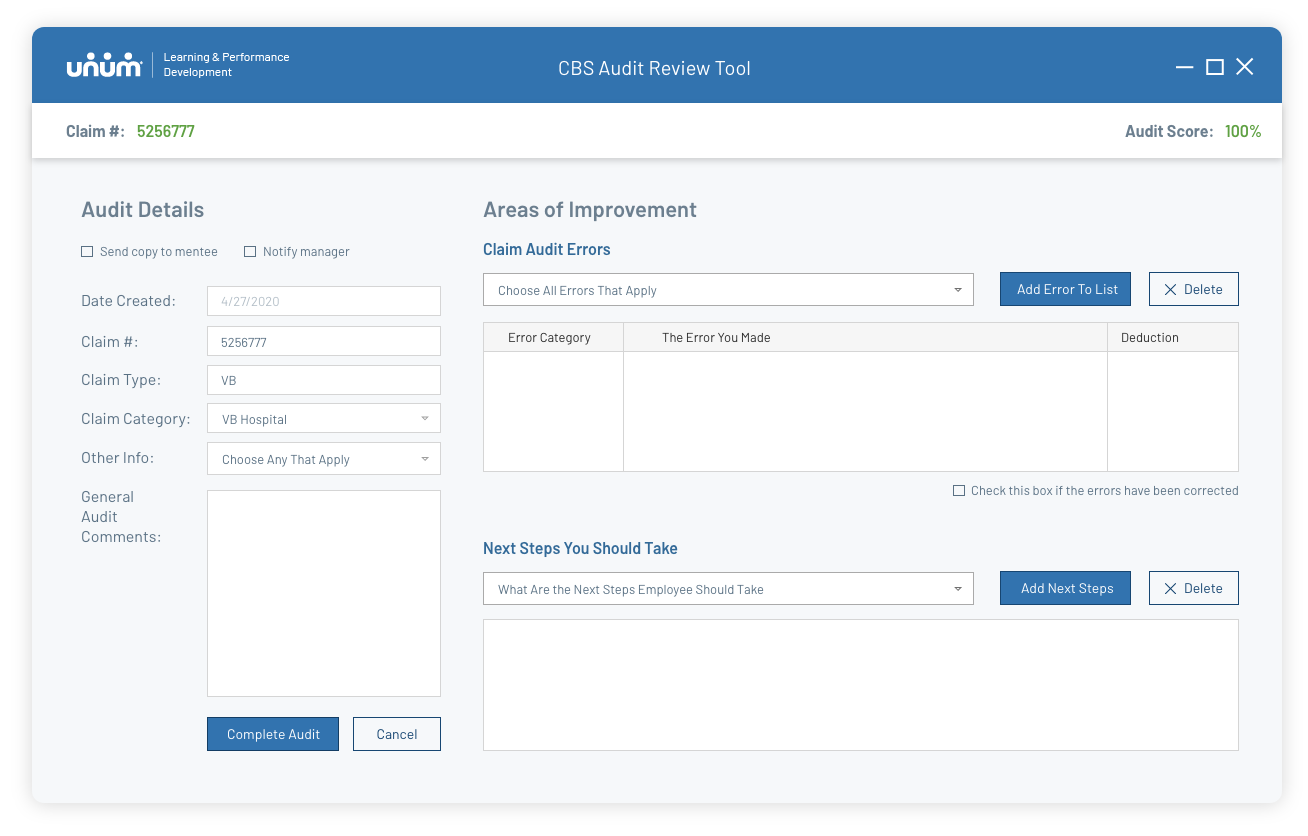
I organized the interface into two distinct zones: fixed claim and audit details on the left, and actionable Areas of Improvement on the right, where auditors document errors, deductions, and coaching recommendations.
I explored what the interface could become, balancing my design ambitions with what I believed I could realistically implement using C# for front-end. From there, I customized native dropdowns, data tables, and input fields through code, working around framework restrictions while preserving the application's business logic.
The result was a more structured, visually consistent experience that extended what I could achieve within the existing technology.
Automating Audit Scoring
Scoring was central to the auditors' workflow. Selecting a department-specific error automatically applied the corresponding deduction and recalculated the audit score in real time, reducing manual effort and supporting consistent evaluations.
I also designed the error-selection system to adapt dynamically to different claim types. This reusable approach allowed additional departments and claim categories to be supported without creating separate screens for each workflow.


Designing for Growth Beyond CBS
What began as a single audit application evolved into a centralized hub supporting multiple workforce management departments.
I approached the design with scalability in mind, establishing consistent navigation, branding, and interaction patterns that could extend across applications. This created a shared foundation for future growth rather than a collection of disconnected tools.
Making System Feedback Visible
Users previously had no indication whether the desktop application was loading or unresponsive. I introduced a branded loading screen with a progress indicator to provide immediate feedback and reduce uncertainty.
Without a formal UI style guide, I drew from UNUM's brand identity to create a more cohesive experience that felt intentional rather than like a standard Windows application.

Wins
“When the new version of the tool was rolled out it was well received by the end users and was able to effectively handle many concurrent users at a time (both intake specialists and managers). One of the biggest "wins" of the app was the responsiveness and effectiveness of the tool with hundreds of concurrent users, which was one of the specific problems I know you and Jonathan worked hard to solve for in the design phase.”
- Ben Gommoll, my former manager at UNUM
Reflections
When I think back to this project, I remember how out of place I felt at first. I came into UNUM with a visual design background, with a lot of heart, and not much experience navigating enterprise software.
It was the first time I felt the weight of people’s financial well-being on the line. I was shaping the workflows of auditors who protected customers at some of the hardest moments in their lives.
That responsibility changed me.
I learned how to sit in ambiguity, how to partner with engineers who spoke a different language, how to translate messy operational processes into something that felt clear and humane. And in the middle of that pressure, something clicked: I wasn’t here to give the organization a pretty interface. I was here to give them confidence, clarity, and a stable foundation they could build on long after my project ended.