
QuickBooks · UX Design · Identity and Access Management · Platform · 2024
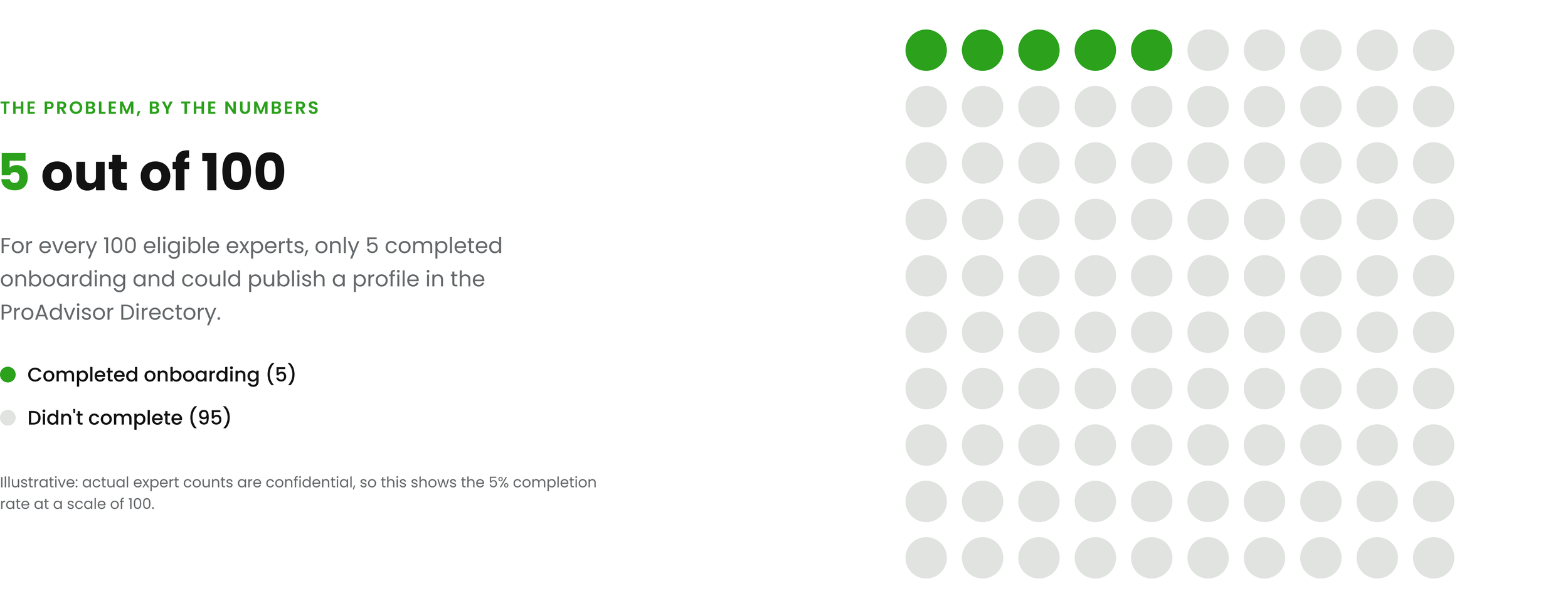
Only 5% of Eligible Experts Were Completing Onboarding To The QuickBooks ProAdvisor Network
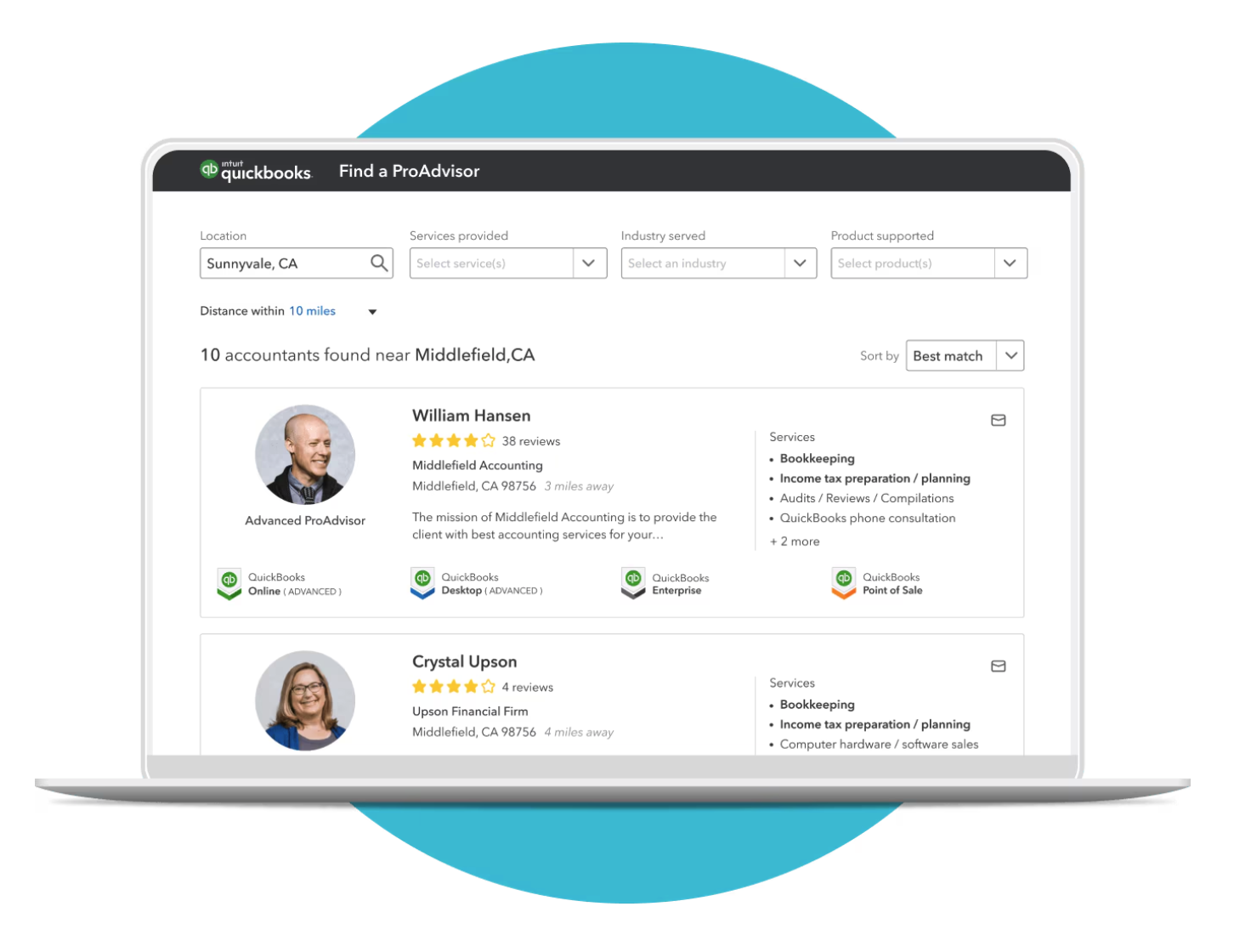
The ProAdvisor Network enables thousands of financial professionals to market their services to small businesses nationwide. However, the identity verification and onboarding process was highly manual: multiple phone calls, duplicate data-entry across systems, long wait times, and heavy operational overhead.
$2–3M in estimated annual revenue lost. Slow verification delayed expert listings, stalled network growth, and drove onboarding abandonment.
Impact: I led identity verification for the QuickBooks ProAdvisor Network, cutting onboarding from days to seconds and support cases by 20%.
Learning about customer needs
Reviewing Experiences and
Talking To Customers
I reviewed archived user studies, watched Pendo sessions, and ran live Zoom sessions talking to experts/accountants, watching them try to onboard and publish their profiles.
Three problems stood out to me:
Hidden requirements. Experts didn't learn about certification and identity checks until they tried to publish. Not enough early informing.
Too many things to do. Every financial expert/accountant I spoke to felt overwhelmed by the documentation they had to prepare just to join ProAdvisor.
Waiting led to abandonment. Verification took days, and many experts disengaged or gave up entirely.

User Journey Audit

🤦🏾
ProAdvisor Directory
Profile Publishing Friction
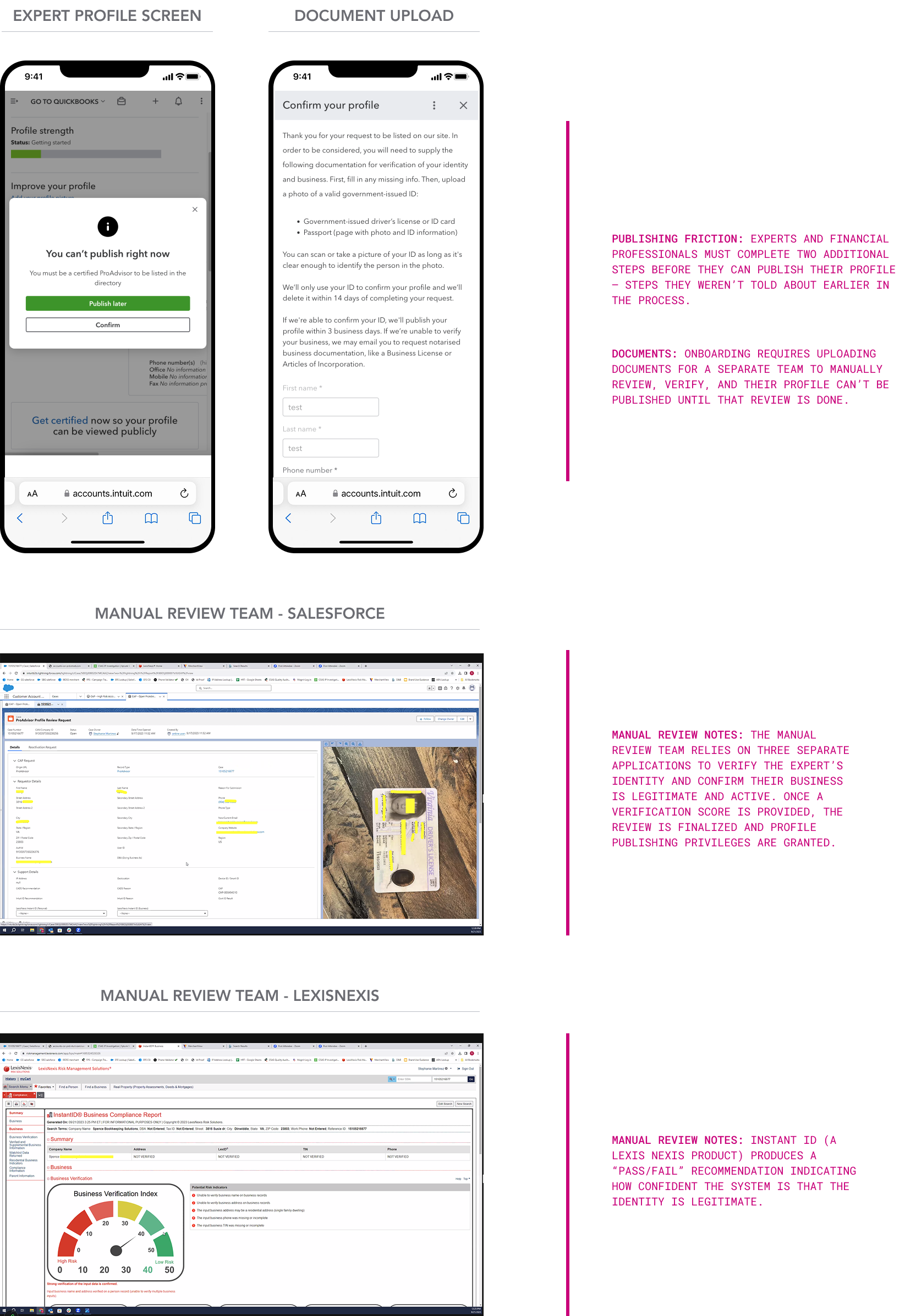
I uncovered that even after completing required QuickBooks trainings and sign-up, users hit a second barrier: a manual document-review and identity-verification process spread across multiple disconnected systems highly dependent on people.
What I owned, end to end
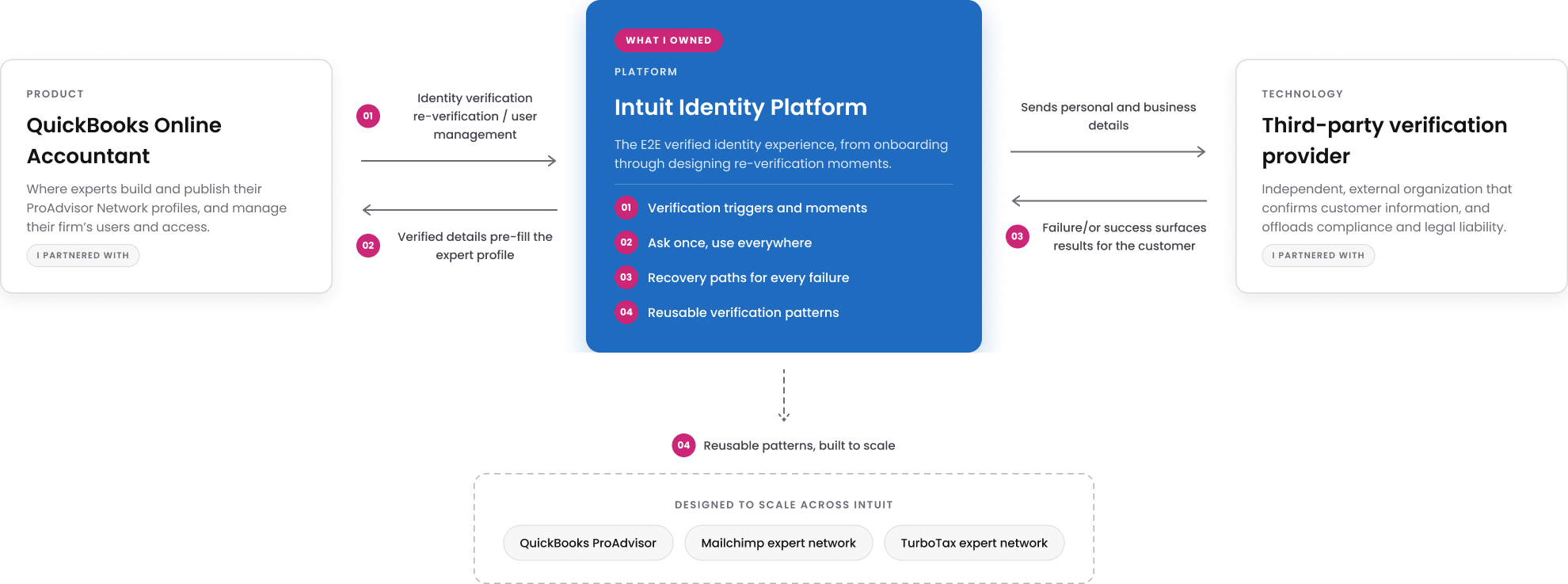
I owned the verified identity experience on Intuit’s platform and influenced the capability’s growth. Working alongside PMs, I served as a subject matter expert, showing how identity verification providers could speed up onboarding, pre-fill expert profiles, and get experts onto the network faster to start attracting customers.
The Responsibilities I Scoped and Defined
Define the verification moments. I owned when and why experts are asked to prove who they are, at onboarding and again when protected details change. I aligned every trigger with backend logic and policy requirements.
Ask once, use everywhere. Following Intuit's platform principle of reuse, I mapped every place experts were asked for the same business details. Now they enter them once, and their verified information automatically fills their ProAdvisor Network expert profile.
Design for reuse beyond QuickBooks ProAdvisor. I built a reusable component library of verification patterns, so other product teams could adopt automated verification without starting from scratch. Once launch results proved success, these patterns gave us a path to Intuit's other expert networks, like Mailchimp and TurboTax.
Looking past the MVP. As we moved through beta, I dug into the data and listened closely to customer sentiment to find new ways the ProAdvisor Network could grow and deliver more value. I then brought these ideas to ProAdvisor leadership as proposals for what came next.
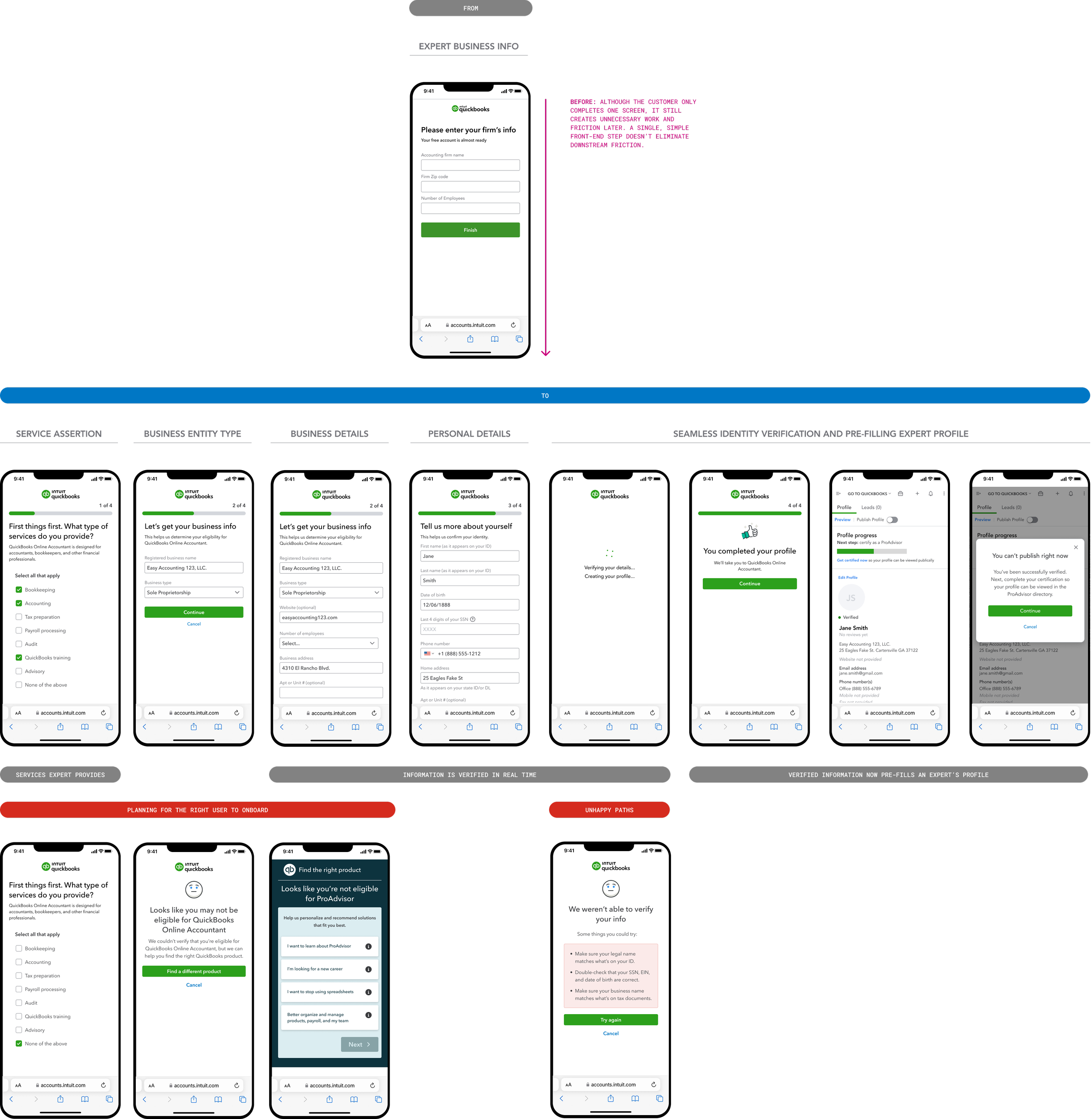
The identity solution
Making real-time verification work for every expert
Product leadership chose a third-party verification service to speed up onboarding. As the team’s identity expert, I turned that decision into an experience accountants could finish in minutes, designed for everything the service couldn’t handle on its own, and made the recommendations that shaped the final experience.
Designs - MVP 1
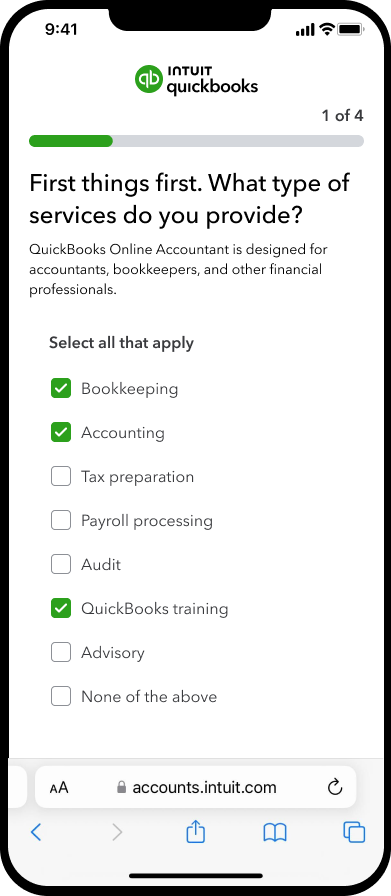
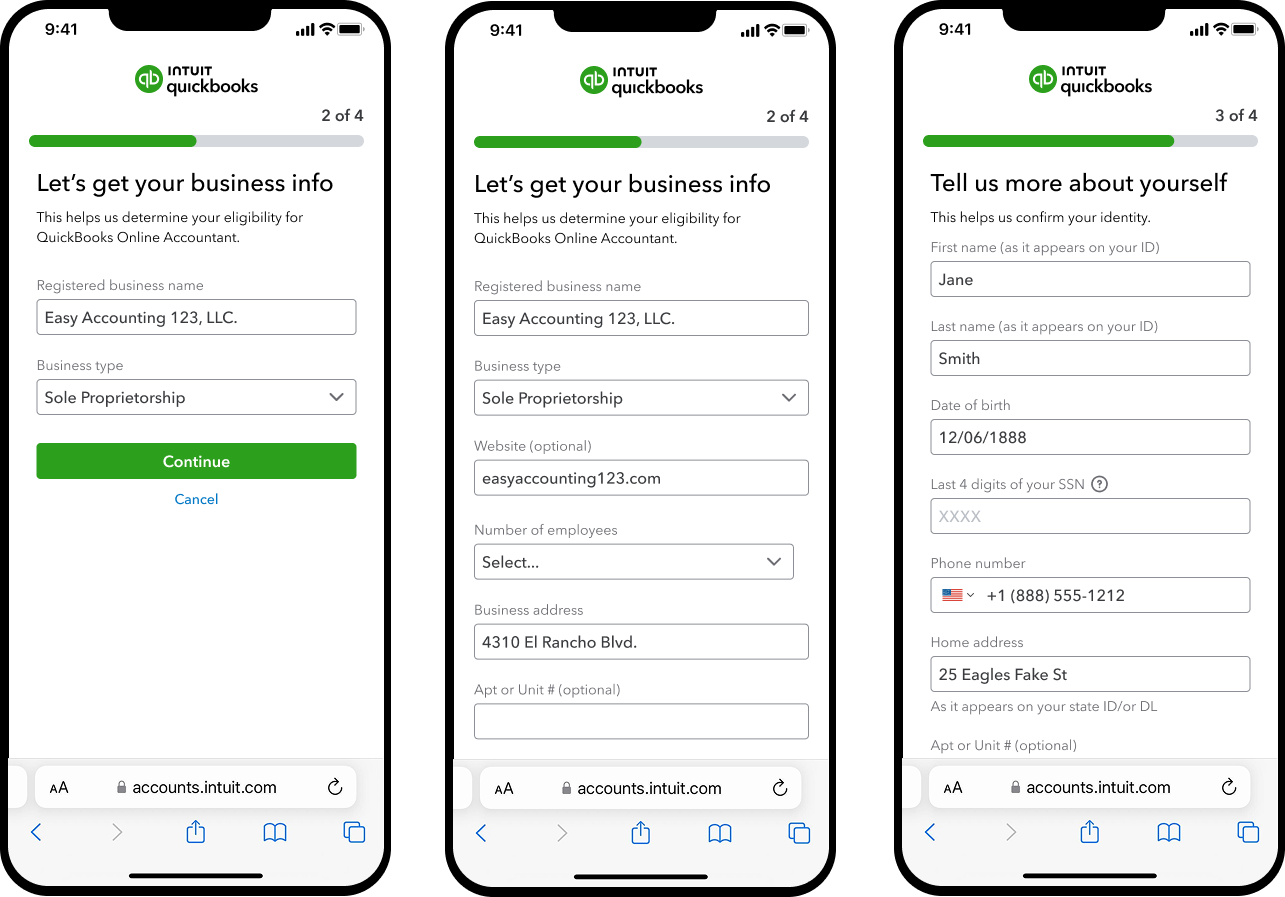
New onboarding experience
In customer interviews, I learned that most users were sole proprietors, which made personal identity verification essential. I added a dedicated owner-information step so each screen stayed focused, and both business and personal verification could be completed in a single flow.
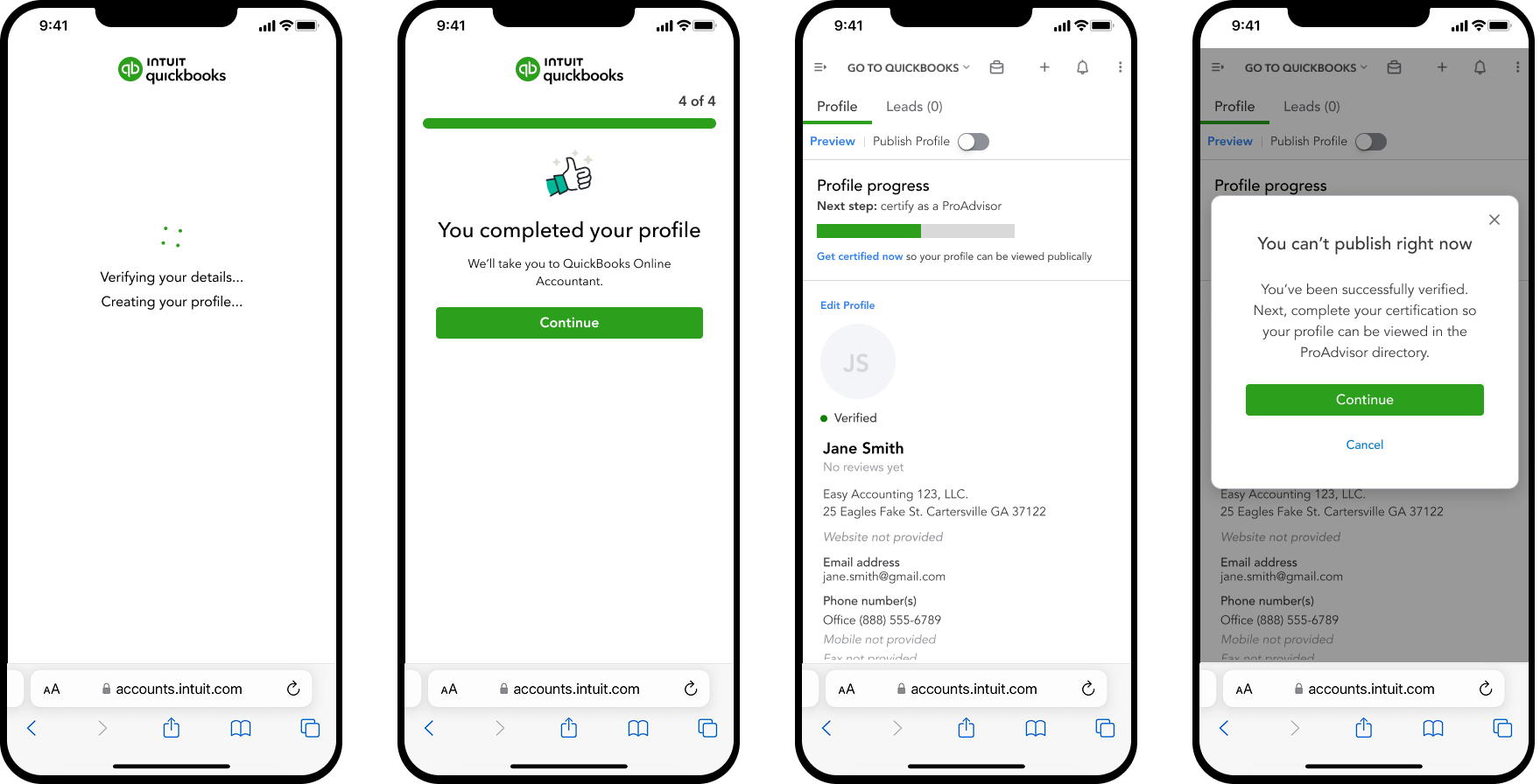
How verification works now. In customer interviews, accountants/financial experts told us they didn't trust what they couldn't see, so my job was to make that invisible process feel transparent and trustworthy.
A wait that feels intentional. During customer walkthrough sessions, participants hesitated or assumed the page had frozen while verification ran. I redesigned the loading state to make it clear that identity was being verified, so a few seconds of processing reads as security rather than a stalled screen.
Confirmation with clarity. Customers were confused by vague verification statuses and unsure what to do next. Drawing on that feedback, I replaced them with clear guidance on what users can and can't do, why, and what comes next. I also used these research insights to advise the QuickBooks team on the product changes needed to support the experience.
Designing For the Unhappy Paths
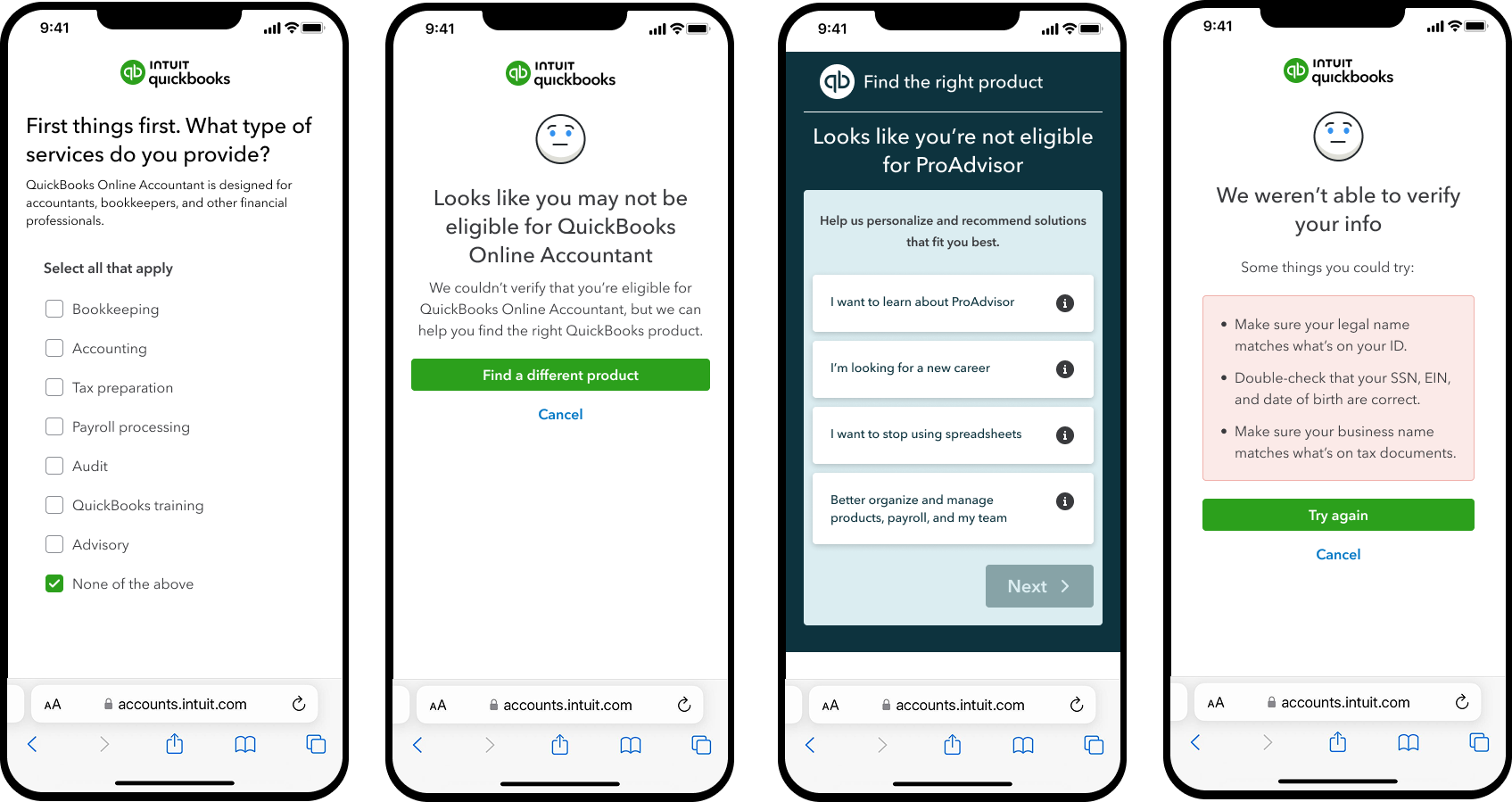
Data revealed an onboarding problem: some users were joining the ProAdvisor Network only to access QuickBooks Online Accountant at a lower cost. They weren't offering services, which cluttered the directory and made it harder for businesses to find accountants they could actually hire.
To address this, I focused on mapping out the common paths a user could take through onboarding, from being guided to the product that best fit their needs to what happens when identity verification fails.
Keeping Verified Profiles Trustworthy
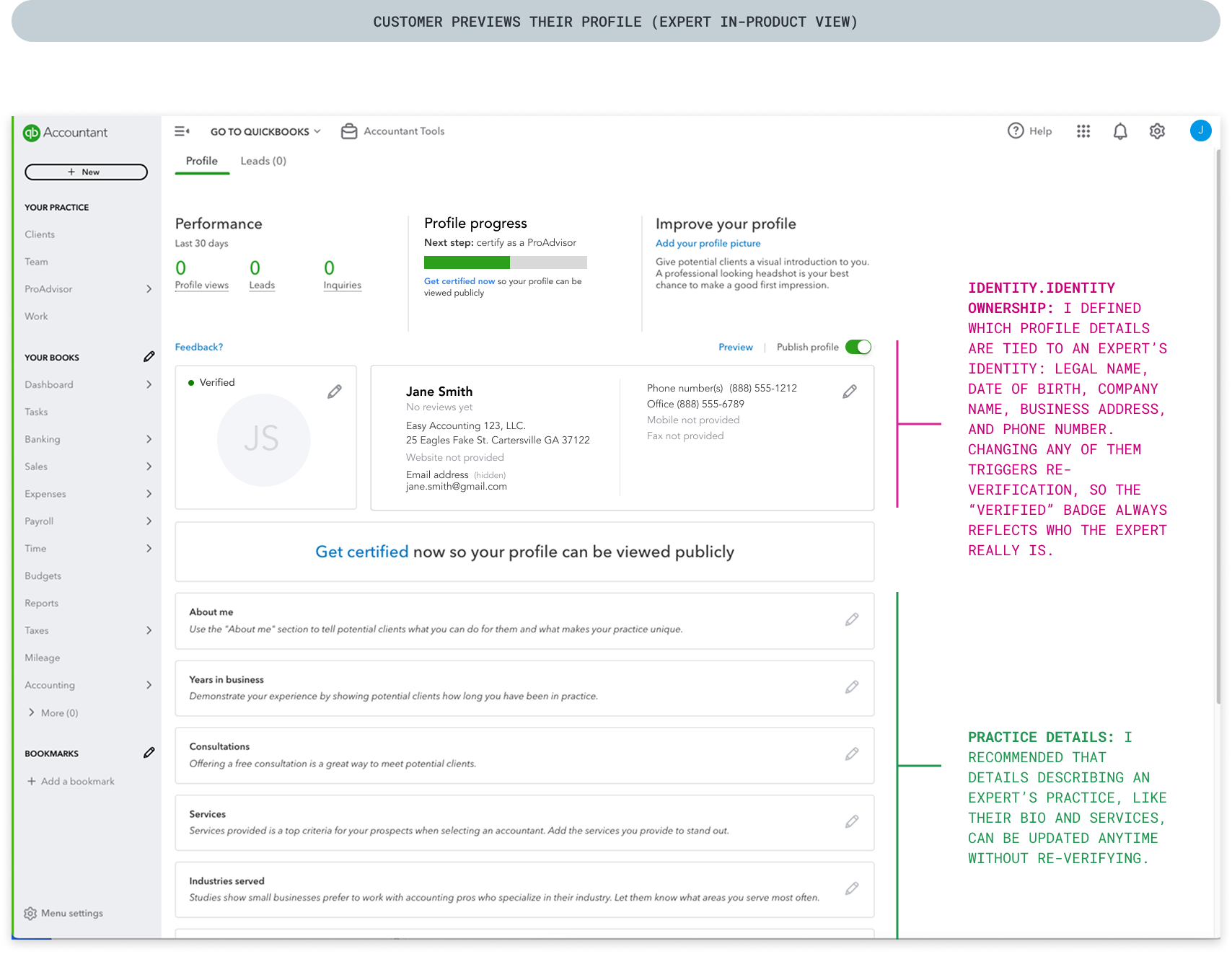
Deciding what counts as identity
During calls with customers I noticed that verification isn't a one-time event. When an expert changes details tied to their identity, the verified badge has to remain trustworthy.
I defined which changes trigger re-verification: legal name, date of birth, company name, business address, and phone number are tied to who the expert is, while practice details like services and bio aren’t. Then I designed the flow that guides experts through it.
A protected change
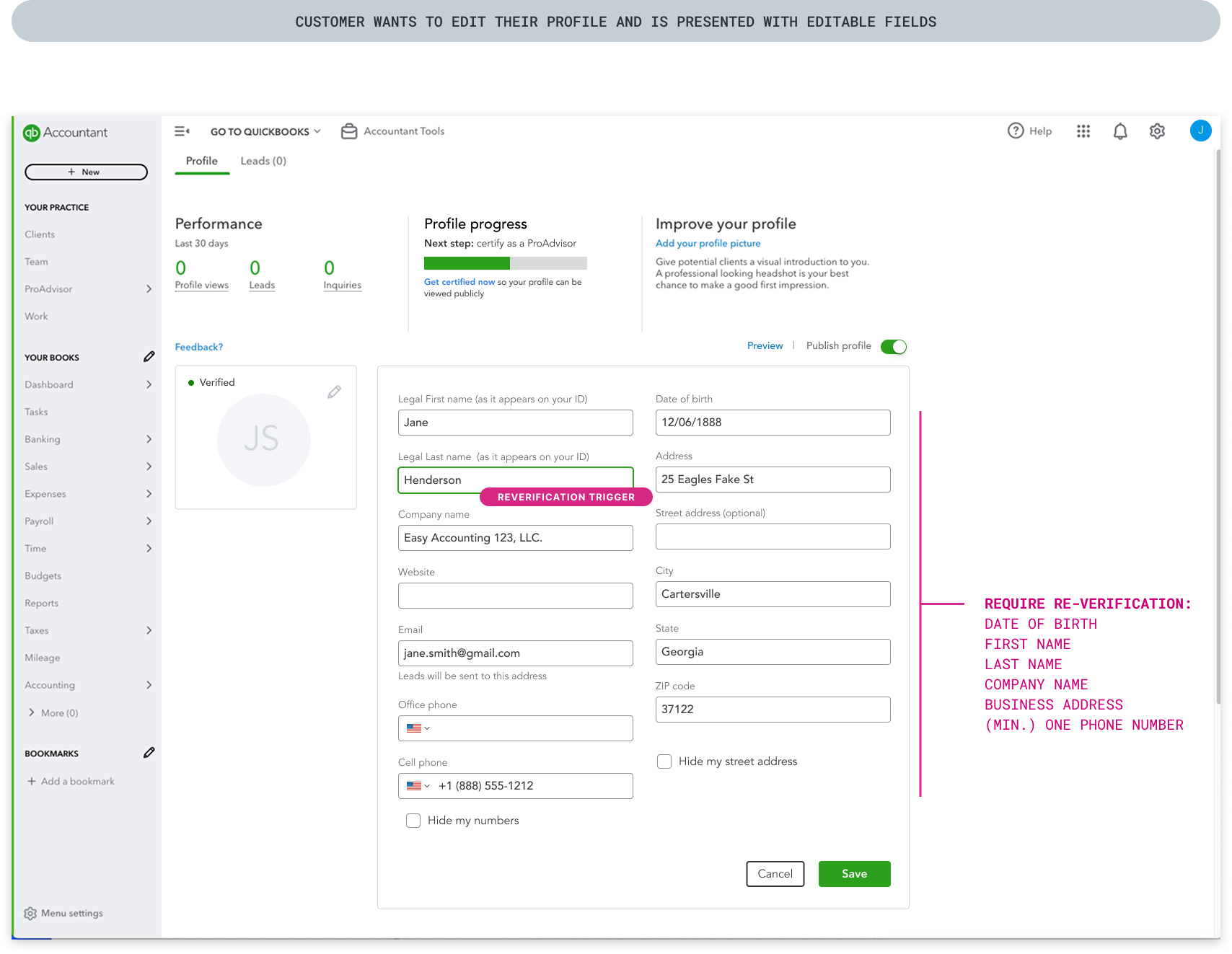
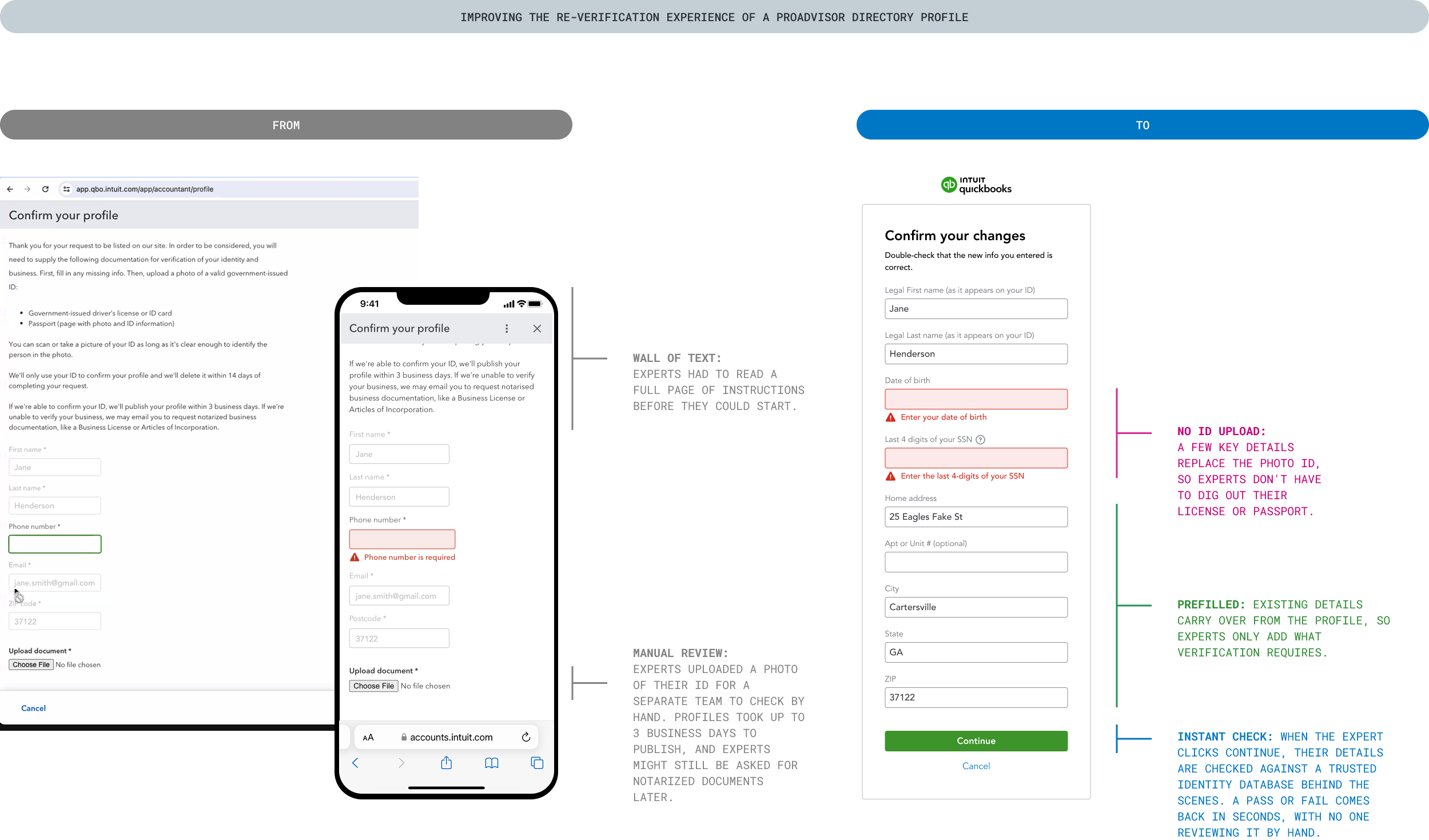
When a user edits their ProAdvisor profile, some fields are tied to a verified identity: a legal name, date of birth, company name, business address, and phone number. Changing any of them, like updating a last name, triggers re-verification. Everything else, like website or bio, can be updated freely.
Being upfront about what the change triggers
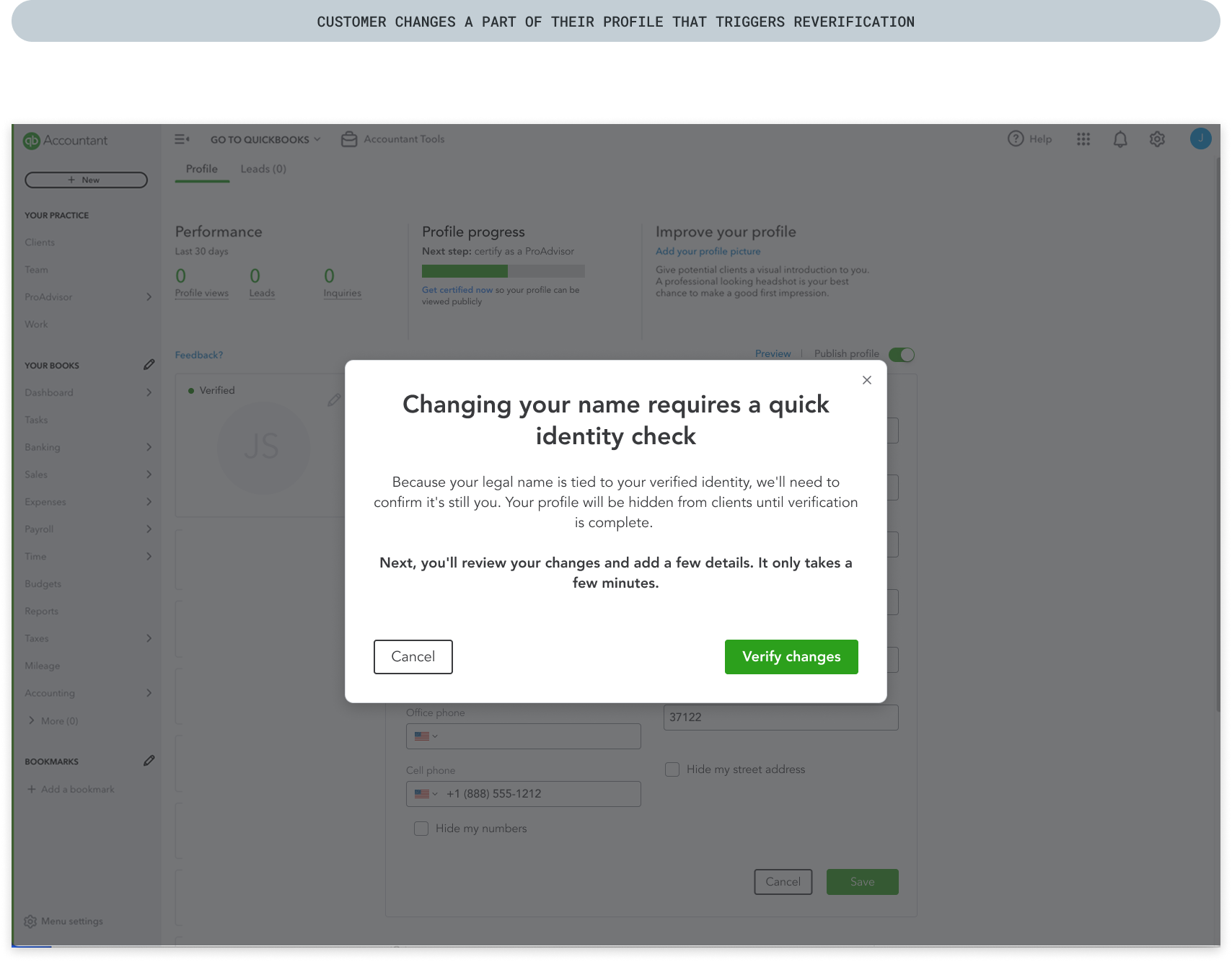
I made sure experts know what's happening before anything changes: the message explains why they need to verify again and that their profile won't be public in the meantime, so they're never surprised when it disappears from view.
Confirm don’t start over
The user's details are prefilled, so they only add what verification requires: their date of birth and the last four digits of their SSN. In the old experience, they would have re-uploaded their driver’s license and waited days for approval, with their profile hidden from potential clients the entire time.
Closing the loop
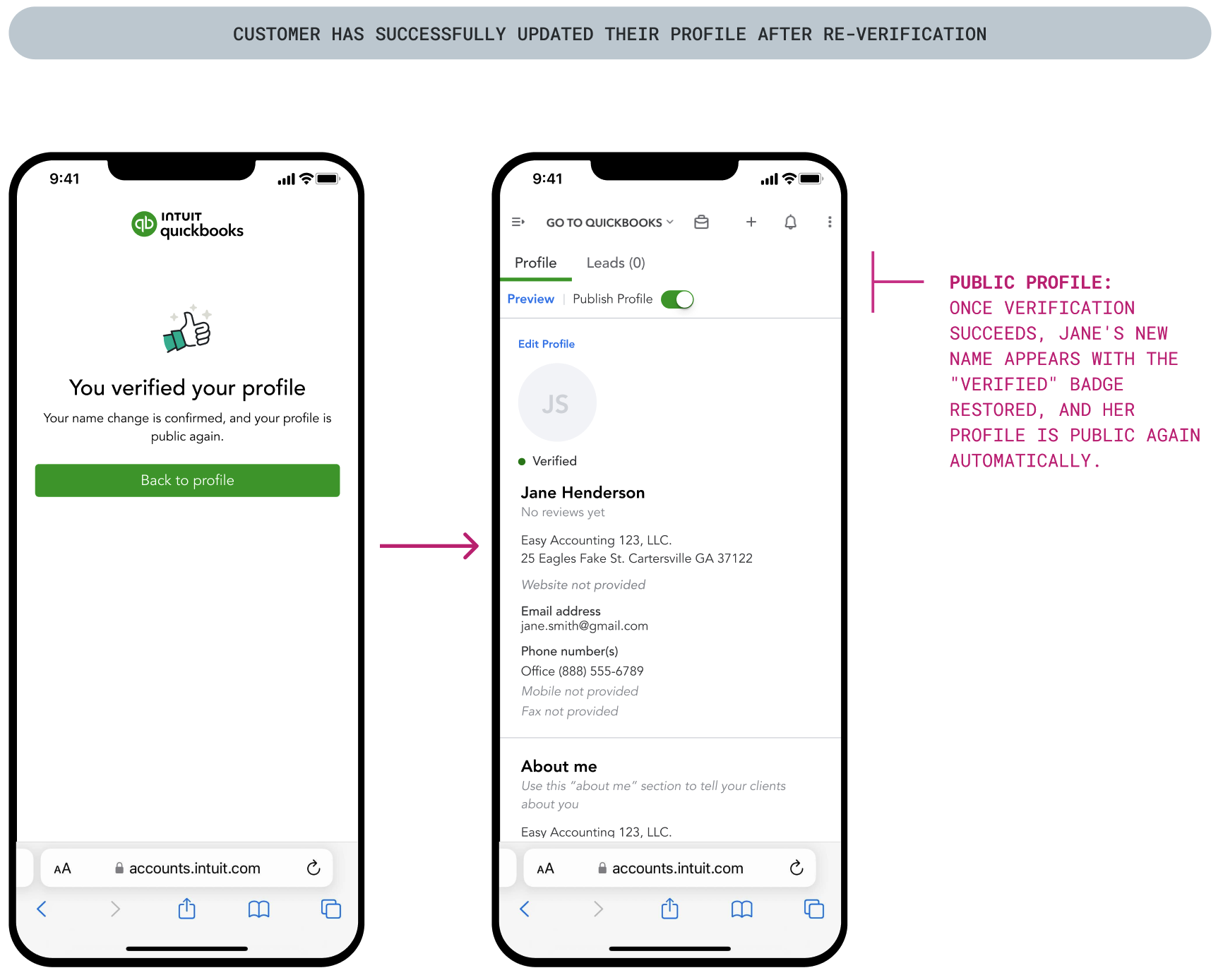
The user was told their profile would be hidden until re-verification finished, so the success screen confirms the name change and that the profile is public again. Back on the profile, their new name, restored "Verified" badge, and publish toggle all show they're done.
Continuous design improvements
Designs - MVP 2
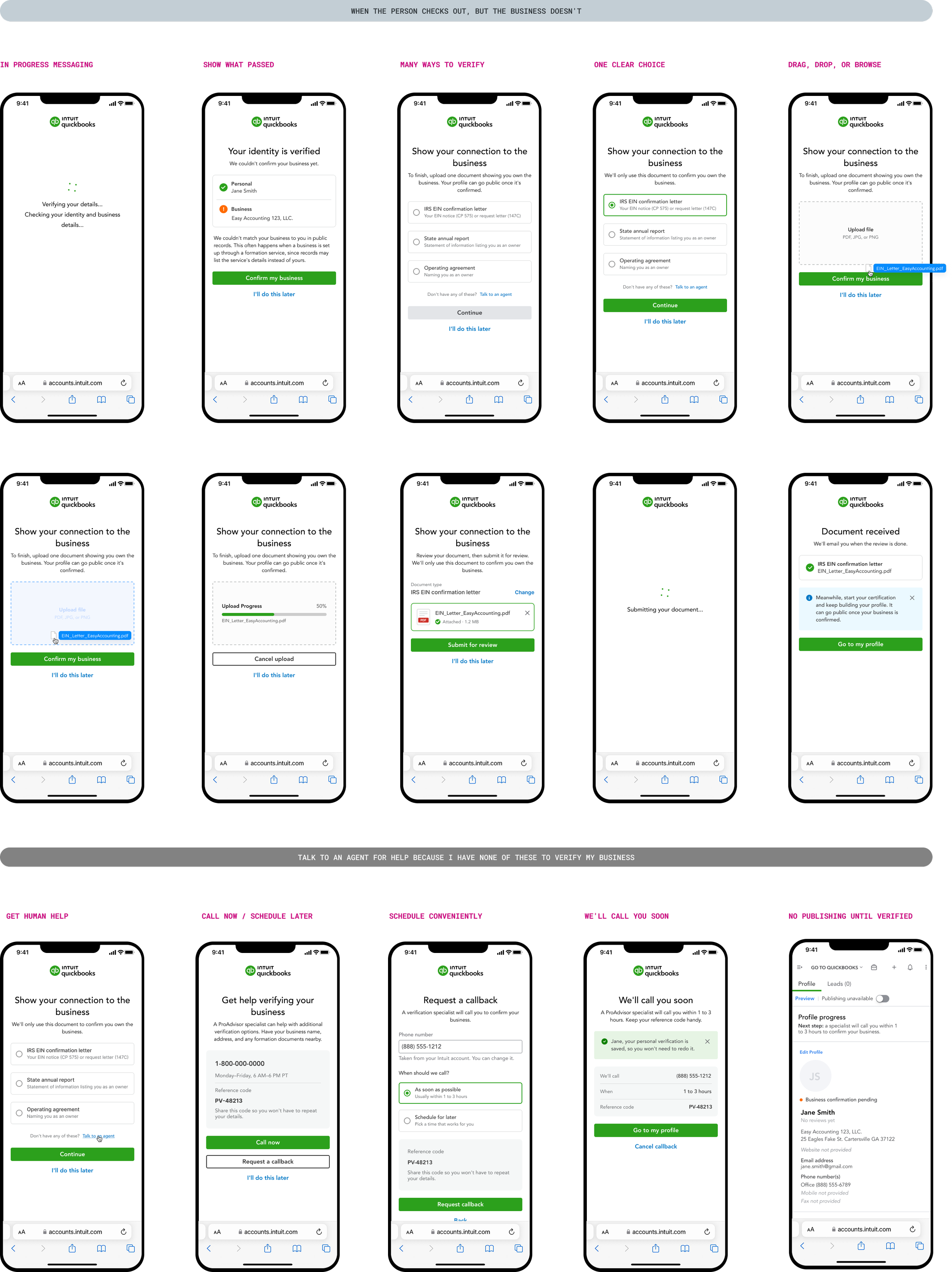
During the MVP 1 beta, I reviewed Pendo data and session recordings and found that 28 customers hit friction at verification. The cause: many businesses are set up by someone other than the owner, like a formation service or an attorney, so the owner’s name often doesn’t appear in public records. Automated matching failed, even for legitimate experts.
I proposed treating this as a partial success instead of a failure. The flow keeps the expert’s verified personal identity, asks for one document linking them to the business, and lets them keep building their profile while it’s reviewed. For experts without the right documents, I recommended the QuickBooks team keep manual review as a fallback.
Looking ahead
Beyond MVP 2: Designing for User Access and Roles
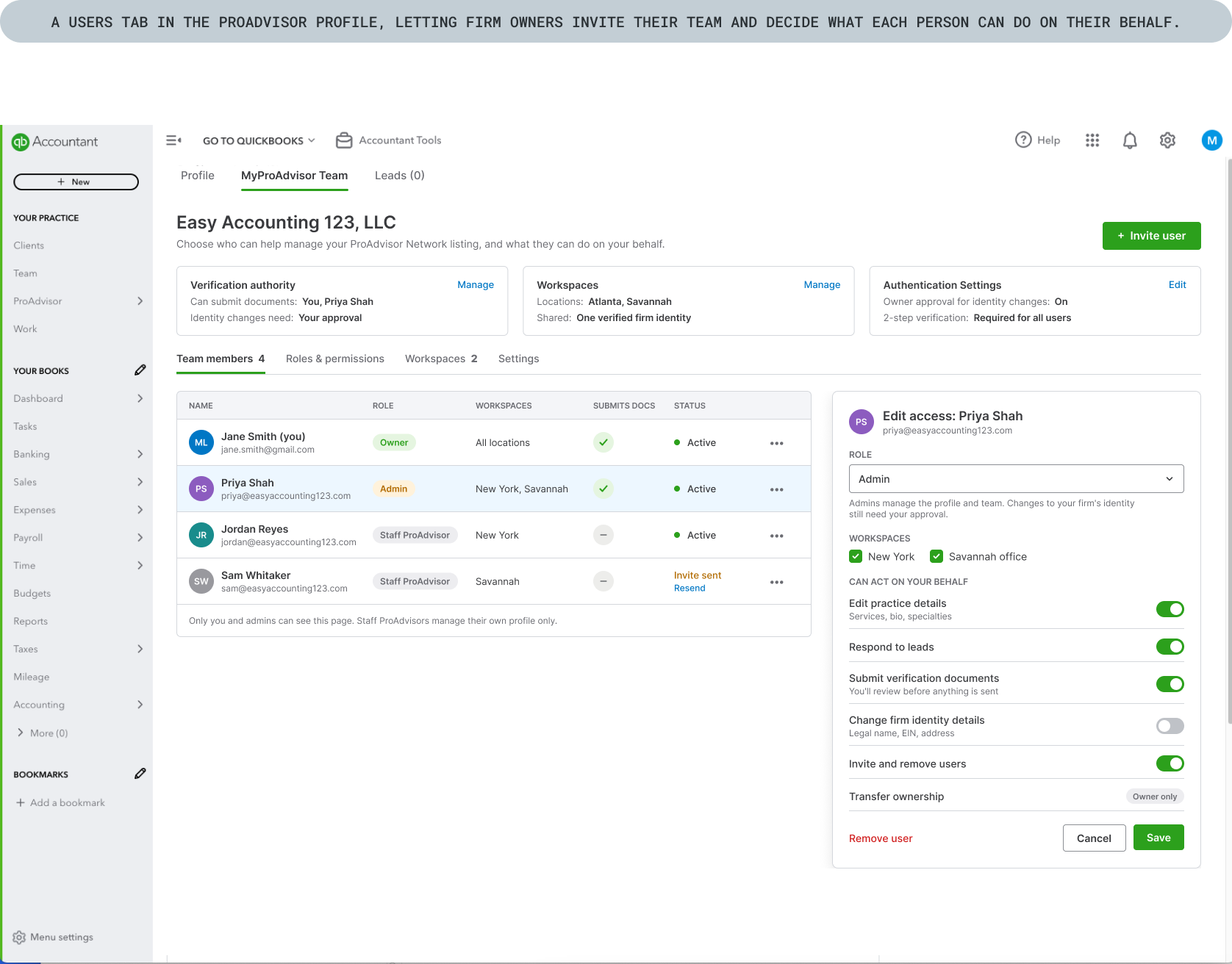
I noticed a pattern: experts kept asking for ways to manage roles and access. What started as an onboarding and verification project revealed another core business problem I hadn’t seen at the start: user management.
Some ProAdvisor Network participants run their practice solo, but many have staff, work with remote team members, or run multiple offices nationwide. The need came up again and again in follow-up customer sessions.
Explorations brought to QuickBooks product leaders
QuickBooks already had user and role management, but it never carried over to QuickBooks Online Accountant, the product ProAdvisor Network customers use. Even the existing capability didn’t cover what firms needed, like controlling who could act on their behalf or verify their business. Rather than wait for permission, I created provocations to show leadership what closing that gap could look like.

Results
From days to seconds. Verification that once took 3–5 days now happens in seconds, so experts reach the directory while they’re still motivated.
20% fewer support cases. Clear steps and recovery paths meant experts could get verified on their own, without a single call for help.
12% fewer fraudulent sign-ups. Automated verification stopped bad actors at the door, protecting the trust clients place in every listing.
Drop-offs became a revenue channel. Accountants who didn’t qualify for the network were redirected to QuickBooks Online instead of leaving empty-handed. Sign-up data also gave leadership new insight into who was joining, sharpening how they marketed the network.
Learnings
-
Launch feedback surfaced a problem nobody had scoped: firms needed to manage their teams and control who could act on their behalf.
-
Beta data showed legitimate experts failing verification because a formation service or attorney had set up their business. Designing for partial success taught me that the system’s edge cases are often real people doing everything right.
-
Designing reusable patterns from day one meant this project could do more than solve one product’s problem. It became proof that shared identity could speed up onboarding across Intuit.